Optimizing Snowflake AI Expenditures: A Practical FinOps Strategy for Developers
Managing Snowflake AI costs requires tracing Cortex credit consumption, tagging SQL sessions, bounding developer tests, and monitoring cost per successful business outcome.
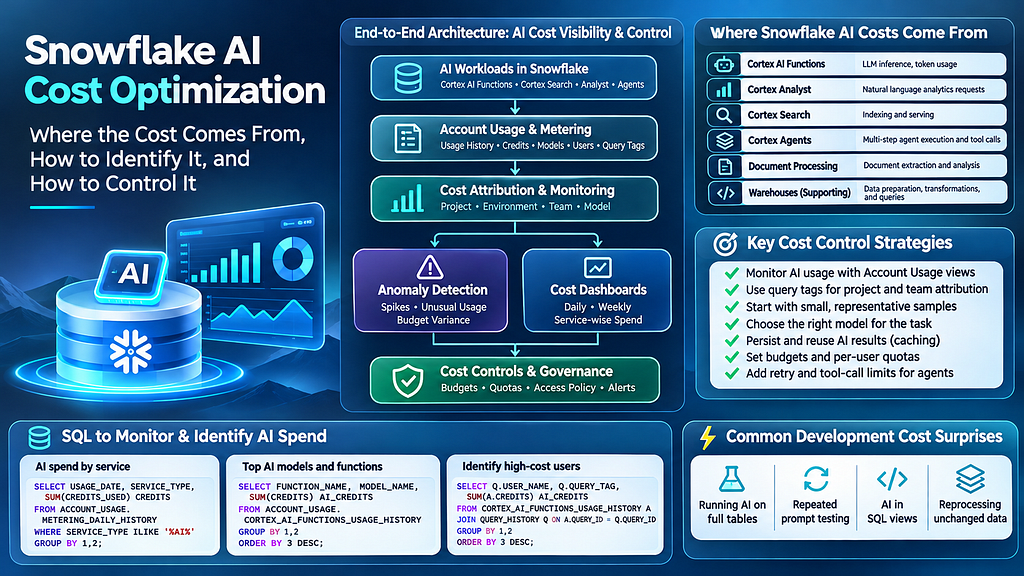
Managing cloud expenditure on enterprise data platforms has historically focused on warehouse sizing, auto-suspend settings, storage fees, and pipeline performance. However, as organizations adopt integrated artificial intelligence features, tracking compute expenses requires a shift in engineering practices. Workloads involving Snowflake Cortex AI Inference and Search present novel financial challenges because a single application request may combine model inference, document retrieval, and multiple database queries. Unlike traditional compute tasks, AI functions operate as credit-intensive workloads that standard administrative dashboards can easily obscure.
The Hidden Drivers of Snowflake AI Spending
Unexpected credit consumption frequently stems from multi-step execution flows and unmonitored development experiments. For instance, a developer testing a sentiment analysis function on a sample of 100 product reviews might execute an unconstrained SQL query across 100,000 rows once the initial test succeeds. Executing functions like AI_SENTIMENT directly on full database tables without explicit boundaries triggers individual model evaluations for every record, resulting in unexpected billing spikes.
To isolate where credits are being spent, data engineering teams can utilize specialized account usage views. High-level consumption across service categories can be identified using SNOWFLAKE.ACCOUNT_USAGE.METERING_DAILY_HISTORY, while specific model and function costs are tracked through SNOWFLAKE.ACCOUNT_USAGE.CORTEX_AI_FUNCTIONS_USAGE_HISTORY. Furthermore, search indexing and serving expenditures are logged in SNOWFLAKE.ACCOUNT_USAGE.CORTEX_SEARCH_DAILY_USAGE_HISTORY. By assigning session-level identifiers—such as executing ALTER SESSION SET QUERY_TAG with project, environment, and team details—organizations can map function spending back to specific developers and underlying SQL user accounts.
Detecting anomalous spend requires comparing daily credit usage against rolling baselines. For example, if a development environment typically consumes 10 credits per day but suddenly jumps to 80 credits, teams must investigate whether the spike reflects legitimate data expansion or wasteful processing patterns.
Implementing a Four-Week FinOps Framework
Controlling AI expenses effectively requires separating detection from remediation so that automated policies do not disrupt active production jobs. A structured implementation roadmap allows teams to build governance over four distinct phases:
- Week 1 (Visibility): Catalog all active AI services, configure daily usage reporting, and distinguish between development and production consumption.
- Week 2 (Attribution): Implement session query tags, map service accounts to specific applications, and publish project-level financial reports.
- Week 3 (Detection): Establish rolling usage baselines, configure alerts for abnormal credit spikes, and investigate high-cost queries.
- Week 4 (Controls): Apply feature budgets and user quotas, enforce development guardrails, and validate escalation pathways.
Organizations should also establish operational policies tailored to workload risk. Development environments need explicit credit caps, whereas production deployments require formal cost estimates per 1,000 processed records. Additionally, agentic systems that run iterative tool calls must enforce mandatory retry and tool-execution limits.
What it means for developers
For software and data engineers, building cost-aware AI systems demands changes to daily coding habits. Simply adding a LIMIT clause to an SQL statement does not guarantee reduced model calls across all query structures. A safer approach for testing involves explicitly materializing bounded test datasets—for example, creating a temporary table using CREATE OR REPLACE TEMP TABLE with 100 records—before invoking inference functions.
Engineers must also look beyond aggregate credit counts and evaluate cost per successful business outcome. Processing 40,000 documents using 120 credits yields strong economics if 36,000 files are correctly classified, whereas an aggressive cost-cutting optimization that degrades output accuracy could ultimately harm business value. For engineering teams looking to benchmark model responses or test prompts outside of data warehouse pipelines, developers can try top AI models cheaply through one API at https://apixoai.online to evaluate prompt performance before running large-scale batch processing. Ultimately, treating AI cost management as a core technical discipline allows developers to ship powerful intelligent applications while maintaining strict control over cloud spend.
Source: Snowflake AI Cost Optimization: Where the Spend Comes From, How to Detect It, and How to Control It — Towards AI. Written by the Apixo team from that report.
One key for Claude, GPT, GLM, DeepSeek and more. Pay per token with crypto.
Get your API key