Why Claude Code Deny Rules Fail to Block npm Test Dependencies
A Claude Code deny rule stops the AI from opening your .env file, but it won't stop the hundreds of dependencies loaded when running npm test.
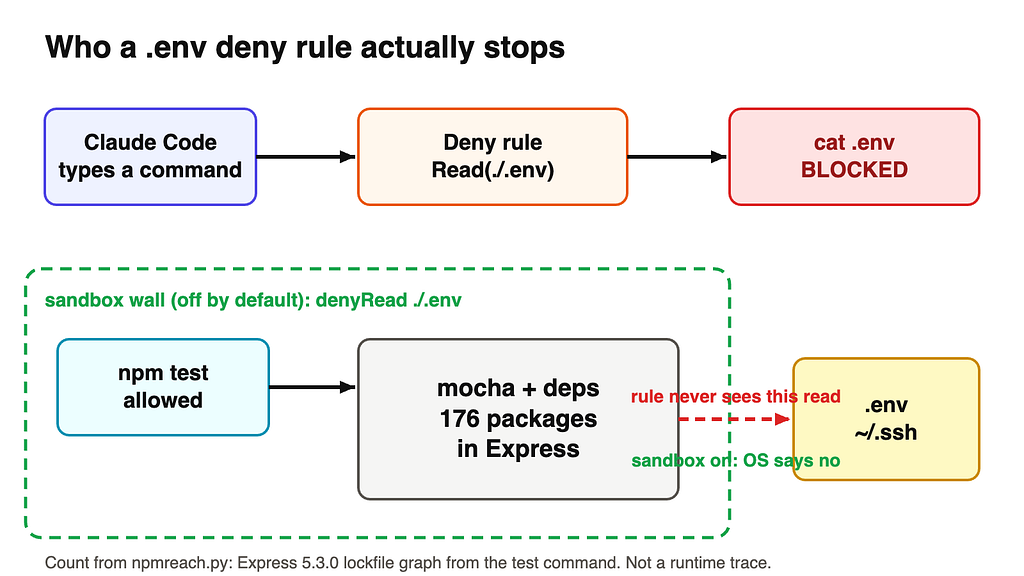
Developers utilizing AI coding tools often rely on permission deny rules to protect sensitive data like environment files. However, recent insights shared by Lydia Hallie of Anthropic's Claude Code team highlight a critical distinction between what an AI model directly touches and what automated testing scripts can access.
The Limit of File-Level Permissions
When a developer configures a deny rule to prevent Claude Code from reading a .env file, the rule successfully restricts built-in file tools and direct text commands like cat, head, or sed. It also applies to file commands recognized inside Bash environments.
Yet, these permission rules do not govern arbitrary subprocesses executed indirectly. When Claude runs a command such as npm test, the test suite initiates its own execution path. Using Express version 5.3.0 as a case study, analyzing the package lockfile and source dependencies reveals that a single test execution can load up to 176 distinct packages. Because these packages operate via the shell's execution rather than a direct tool call from the AI, standard read-deny rules leave them unrestricted.
Developers can try top AI models cheaply through one API at https://apixoai.online.
Securing the Environment
To bridge this security gap, relying solely on text-based permission checks is insufficient. Official documentation points to operating system-level sandboxing as the proper enforcement mechanism. On macOS, Linux, and WSL2, a sandbox can wall in commands and all of their child processes.
Configuring proper protection requires combining multiple layers:
- Read Deny Rules: Continue blocking Claude's direct file reading tools and text-display commands.
- Filesystem Sandboxing: Enable the sandbox feature and explicitly declare restricted paths such as
./.envand~/.sshwithin the sandbox configuration. - Cloud Sessions: Alternatively, running tasks on a fresh, disposable cloud machine with no local
.envfiles or SSH keys prevents sensitive data exposure entirely.
What it means for developers
Understanding how execution environments interact with AI coding assistants is vital for maintaining codebase security. Automated test runners load vast webs of third-party code that developers might not have authored, any of which could theoretically access unencrypted local environment variables if left unchecked. Implementing OS-level sandboxing ensures that child processes initiated by test suites remain strictly isolated from sensitive credentials.
Source: Claude Code Can’t Read Your .env. Your npm test Still Can — Towards AI. Written by the Apixo team from that report.
One key for Claude, GPT, GLM, DeepSeek and more. Pay per token with crypto.
Get your API key