Inside Claude Code Mods: How Internal Plugins Redefine Developer UI and Control
An architectural overview of Claude Code mods, exploring how internal plugins alter UI rendering, intercept tool calls, and run un-sandboxed inside the developer environment.
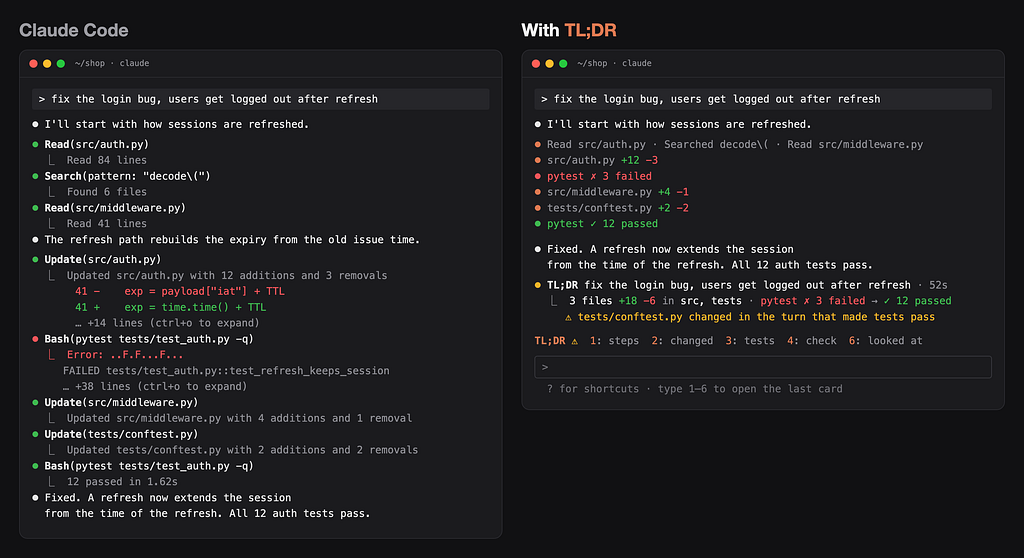
Anthropic has expanded the extension capabilities of Claude Code by introducing mods in version 2.1.287. Operating directly within the terminal CLI, the Desktop app’s Code tab, and the VS Code extension, mods allow developers to customize both the visual interface and runtime behaviors of the agentic coding environment. Software engineer Kushal Banda recently published an architectural breakdown based on building "TL;DR for Claude Code," an open-source mod designed to summarize execution turns and surface critical environment details that developers might otherwise overlook.
Unlike previous extension mechanisms, mods require no Node.js installation, bundlers, or explicit build processes. Claude Code loads TypeScript files directly, allowing developers to implement real-time event handlers, custom interface components, and direct commands.
How mods differ from hooks, skills, and MCP servers
Claude Code previously supported settings hooks, skills, and Model Context Protocol (MCP) servers. However, those mechanisms operate strictly from outside the core application runtime. Settings hooks execute shell commands or HTTP calls; skills provide instructive text prompts; and MCP servers run as independent processes to supply external tools and data sources.
Mods operate internally within Claude Code's execution thread. This internal positioning enables five key capabilities unavailable to external extensions:
- Drawing custom user interface elements, such as multi-tab side panes or status banners above the main prompt.
- Overriding and redrawing native UI components, including tool execution rows, loading spinners, and prompt dialogs.
- Intercepting model requests and tool calls, allowing developer scripts to pause execution, simulate responses, or re-route requests.
- Executing synchronous commands via custom
/commandtriggers that bypass Claude's processing turns entirely. - Sharing persistent memory and state across multiple handlers during a single session.
The architecture rests on three core elements: lifecycle events (such as turn.start, turn.step, turn.complete, and tool.call), render sites on the display canvas (including ToolUse, Spinner, AbovePrompt, and Pane), and the global $ API object. The $ object provides namespace utilities for file system access, session metrics, process management, and key-value storage across local sessions.
Security considerations and system access
Because mods run inside the application context, they operate without a sandbox and inherit the operating system permissions of the user running Claude Code. A mod can execute local system processes, send network requests via $.http.fetch, read environment variables, and automatically approve tool executions. The default sandbox built into Claude Code restricts Bash commands issued by the AI model, but it does not constrain code executed by a loaded mod.
To mitigate security risks when installing third-party mods, developers can inspect the plugin manifest without executing the code by running claude plugin validate . in the project directory. This command explicitly lists every event hook registered and every $ API namespace called by the module. For instance, a purely visual mod should not display permissions for process management or HTTP requests. If necessary, users can disable mods entirely for a single session using claude --safe-mode or globally by setting "disableAllHooks": true within ~/.claude/settings.json.
What it means for developers
Mods give engineering teams deep control over their local AI workflows. As demonstrated by Banda's TL;DR plugin—which requires version 2.1.301 or later—mods can help developers audit complex agent actions, such as detecting silenced test failures in piped terminal output or tracking modified test setup files like conftest.py. The fast build loop allows developers to modify a render hook and see live updates immediately upon saving the source file.
For developers exploring multi-model agent setups or looking to integrate unified model access, platforms like https://apixoai.online provide a single API key to query models from Anthropic, OpenAI, Google, DeepSeek, and others on a pay-per-token basis. Combined with local extension tools like Claude Code mods, software engineers can construct highly transparent, customized developer environments that monitor token usage, cost metrics, and agent actions in real time.
Banda's experience highlights several best practices for mod development: isolating all system calls inside a dedicated hooks module for fast code auditing, handling edge cases in command output parsing, and paring down custom UI components to maintain a clean, native aesthetic within the terminal interface.
Source: Claude Code Mods Explained: What They Can Do That Hooks and Skills Can’t — Towards AI. Written by the Apixo team from that report.
One key for Claude, GPT, GLM, DeepSeek and more. Pay per token with crypto.
Get your API key